Hey there, if you’re running a shop floor with a machining center (or ten), you know these things don’t run on luck—they run on consistency, tiny little checks, and not ignoring that weird squeak that showed up last Tuesday. I’m gonna keep this real, too—no fancy jargon that makes you Google half the words mid-read, no stuff that makes you think “this only works if you have a whole maintenance team on payroll.” I’m a machining center supplier, so I’ve seen the good, the bad, and the “that machine broke ‘cause someone skipped a $5 filter” disasters. This is all stuff I’ve walked my customers through, week in and week out, no corporate fluff. Let’s dive in. Machining Centers

First off, let’s get one thing straight: maintenance isn’t just for when the machine’s making terrible noise or throwing error codes at you. I see so many shops waiting till their machining center’s down for 3 days (costing them thousands in missed jobs) before touching it. That’s like waiting till your car’s engine seizes to change the oil—stupid, expensive, and totally avoidable. The goal here is proactive, not reactive. Small, daily and weekly checks that take 10 minutes max, and some monthly/quarterly deep dives that pay for themselves in not having to replace a $10k spindle prematurely.
Let’s start with daily stuff—stuff you can do before your first part of the day, so it doesn’t cut into production time. I tell every new customer: don’t skip the pre-shift walkaround. It’s the easiest habit to build and the one that catches 80% of little issues before they blow up. First, eyeball the spindle. Not just the outside—wait for it to spin for 10 seconds after you power it on. Do you hear any weird grinds, not the normal low hum? Is there any excess heat? If you can put your hand (gently!) on the spindle after a test run and it’s too hot to hold for 3 seconds, that’s a red flag—don’t ignore it. Most of the time, that’s a sign of insufficient lubrication, not a dead spindle, but catching it early means you just top up oil instead of buying a whole new spindle.
Next on daily: coolant. Your machining center’s coolant isn’t just something that squirts on the part to keep it cool. It’s the lifeblood of the whole cutting process, and if it’s messed up, you’re gonna get bad parts, clogged nozzles, and even rust in the machine ways. First thing each day, lift the coolant tank lid (yeah, I know it’s gross, but deal with it). Smell it. If it smells rotten, like old eggs or mildew, that’s bacteria growing. Gross, but fixable—just drain it, clean the tank, add fresh coolant and water mix (follow the ratio on the coolant bottle, don’t just pour straight coolant, that ruins the mix). Also, check the coolant level—if it’s below the minimum line, top it up, but don’t overfill it, ‘cause that’ll make it slosh and spill during high-speed runs. And quick check: are the nozzles clear? Sometimes tiny metal shavings get stuck in there, so you gotta blow ‘em out with compressed air once a day. Clogged nozzles mean your tool overheats, snaps mid-cut, and now you’ve gotta stop the whole job to replace a $20 end mill, plus fix the part you ruined. Worth the 10 seconds, trust me.
Oh, and the axis ways—those are the smooth metal rails the machine moves along for X, Y, Z axes. At the end of your shift, before you power down, wipe each way with a lint-free rag (don’t use paper towels, they leave little fibers that scratch the ways) and put a tiny coat of way oil on ‘em. Most machines have an automatic lubrication system, but even that can skip a spot if a line’s clogged. I had a customer last year who skipped this for 2 months ‘cause “the machine says it’s lubricated” and ended up with a scored Z-axis. They had to replace the whole rail, which cost $8k and 2 weeks of downtime. All ‘cause they wiped a rag over the ways for 2 minutes every night. That’s the stuff I’m talking about—no brain, no big cost, just habit.
Now weekly stuff, a little more involved, but still not a full day’s work. Let’s talk about filters. Your machining center has a few filters, and they all have jobs: one for the coolant, one for the hydraulic system, one for the air intake. Every week, take a look at the coolant filter. If it’s clogged with metal shavings, the pressure drops, so coolant doesn’t get to the cutting zone. You don’t need to wait for the error code—just pull it out, rinse it, or replace it if it’s super gunky. Hydraulic filters are a little different; check your machine’s manual for the hour count, but a good rule of thumb is every 500 hours or once a month, whichever comes first. Air intake filters are easy—just pull ‘em off and tap ‘em against a trash can to shake out dust and dirt, especially if you’re running in a shop that’s not super clean (we all have those woodworking or metal stamping chips flying around). Clogged air filters make the machine’s internal parts overheat, which shortens their life. I can’t tell you how many times a simple filter swap extended a spindle’s life by 2 years.
Also weekly: check the tool changer. That’s the arm that swaps tools when you run a different end mill or drill bit. Do a test tool change with an empty tool first, no part on the table. Watch the arm—does it move smoothly, or is there a slight jerk? Does it line up the tools correctly, or does it seem like it’s off by a hair? If it’s off, you might just need to adjust the tool offset, or it could be worn parts in the arm. Catching that early means you don’t get a tool that’s misaligned, which cuts into the part holder or the machine table, causing expensive damage. Another weekly check: the door seals. When the machine’s cutting, it’s got coolant and chips flying everywhere, and those seals keep ‘em from getting into the electrical parts. Run your hand along all the door gaskets—if there’s a crack or a chunk missing, replace it. I had a customer who ignored a torn door seal for 3 months, and coolant got into the control panel, fried the whole system. They had to wait 6 weeks for a new control board, and missed a big order ‘cause of it. Again, tiny thing to check, huge payoff.
Now let’s get into monthly and quarterly stuff—these are the deep dives that keep the machine running like it did on day one. First, check the drive belts. Your machining center has belts for the spindle, the axis drives, maybe the coolant pump. Over time, these stretch, crack, or get worn out. How do you check them? Turn the machine off, unplug it (safety first, guys), then pull on each belt. If it moves more than half an inch, that’s too loose, and if you press down on it and it feels squishy, or you see cracks on the sides, replace it. Don’t wait for a belt to snap mid-production—again, downtime is way more expensive than a $20 belt.
Monthly also: check the backlash. Backlash is that tiny gap between the axis gears that makes the machine move slightly off when it’s reversing direction. If your parts are coming out with weird size errors, like the holes are slightly off round, or the cuts aren’t consistent, that could be backlash. Most modern machining centers let you adjust backlash through the control panel, but you gotta check it first. How? Do a simple test: move the axis 1 inch in the positive direction, then move it back 1 inch in the negative. If it doesn’t line up exactly, that’s backlash. Adjust it to fix it—takes 10 minutes, saves you from scrapping a whole batch of parts ‘cause of bad alignment.
Quarterly stuff: let’s talk about the control panel. That’s the brain of your machining center. Blow out the dust from the vents with compressed air (again, don’t hold the air nozzle too close, you don’t want to damage the circuit boards). Also, check all the cables connecting the control panel to the machine. Are any of them frayed? Are the connectors loose? Frayed cables cause random error codes that make no sense, or even sudden shutdowns mid-job. Last quarter, a customer had a job that was 80% done, and the machine just shut off. Turned out a cable under the table was frayed from moving, and replacing it took 15 minutes instead of redoing the whole part.
Also, every quarter, it’s a good idea to calibrate the machine. That sounds fancy, but it’s just checking that the axes are moving exactly where they’re supposed to. Most machining centers come with calibration software, or you can hire a tech (hint: I can connect you to certified techs for this, no matter where you are) to do it. A calibrated machine makes parts that are consistent, so you don’t have to scrap parts that are slightly off spec.
Wait, can we talk about common mistakes I see all the time? Skipping lubrication. Yeah, the machine says automatic lubrication, but sometimes the lines get clogged with old oil, so the ways or the gears aren’t getting oil. I tell my customers to add a manual lubrication step—once a week, put a little grease on the axis gear boxes, or top up the lubrication reservoir. Another big mistake: using the wrong coolant mix. If you use straight coolant (no water) it’s too thick, clogs nozzles, and can cause rust. If you use too much water, it doesn’t cool the parts well, and bacteria grows faster. Follow the ratio on your coolant bottle, and test the concentration once a month with a cheap refractometer—super cheap, like $20, and saves you from a lot of headaches.
And don’t forget to keep records! Write down when you changed filters, when you did lubrication, when you noticed any weird noises. That way, you can spot patterns—like, every 6 months, a certain filter clogs, so you can swap it before it causes issues. Records also help if you have a warranty issue later on, ‘cause you can prove you maintained the machine properly.
Now, let’s be real—no one has time to do all this every single day, but if you stick to a simple schedule, it’s not that bad. Daily: 10 minutes pre-shift, 5 minutes post-shift wiping. Weekly: 30 minutes checking filters and tool changer. Monthly: 20 minutes on belts and backlash. Quarterly: 1 hour on calibration and control panel. That’s it, no more than 2 hours a week total. Compare that to the thousands of dollars you save in downtime, part scrapping, and big repairs—this is a no-brainer.
At the end of the day, your machining center is an investment, right? You didn’t drop $50k, $100k, even $200k on a machine just to let it wear out in 5 years ‘cause you didn’t maintain it. I’ve seen machines run 15+ years with proper maintenance, pumping out parts like new, and others that are junk in 7 years ‘cause the owner waited till something broke to fix it.
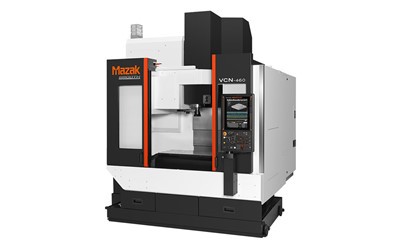
If you’re looking for a new machining center, or you need help with maintenance tips specific to your machine, or even if you just have a question about that weird squeak you’ve been hearing—hit me up. I’ve worked with shops big and small, from mom-and-pop operations to big manufacturing plants, so I know what works for every level. Don’t let preventable issues kill your production flow. Let’s get your machine running at its best, for as long as possible.
Horizontal Machining Centers REFERENCES:
- National Institute of Standards and Technology. (2021). "Proactive Maintenance Strategies for CNC Machining Equipment." Manufacturing Extension Partnership.
- Society of Manufacturing Engineers. (2022). "CNC Machining Center Maintenance Best Practices." SME Handbook for Machining Operations.
- Haas Automation Inc. (2023). "Daily, Weekly, and Monthly Maintenance Guidelines for VF-Series Machining Centers." Operator’s Manual Supplement.
Hermens Industrial Co., Ltd.
As one of the most professional machining centers enterprises in China, we’re featured by quality products and low price. Please rest assured to buy cheap machining centers in stock here and get quotation from our factory. We also accept customized orders.
Address: 9/59 Moo 14, Rachathewa , Bang Phli , Samut Prakan Province 10540
E-mail: liu_jincheng@hzhemen.com
WebSite: https://www.hermensindustrial.com/
