If you’re running a custom apparel business, or sourcing DTF (Direct to Film) printers as a reseller, you know how critical uptime is to keeping orders moving and keeping customers happy. Over the past five years, I’ve spent thousands of hours on the phone and in service calls with small business owners, print shop managers, and startup brand owners who’ve hit roadblocks with their DTF printers. As a DTF printer supplier, I don’t just sell machines— I train users to spot issues before they become costly, and walk through fixes that don’t require calling a technician every other week. Let’s break down the most common DTF printer errors we see, why they happen, and how to solve them. DTF Printer
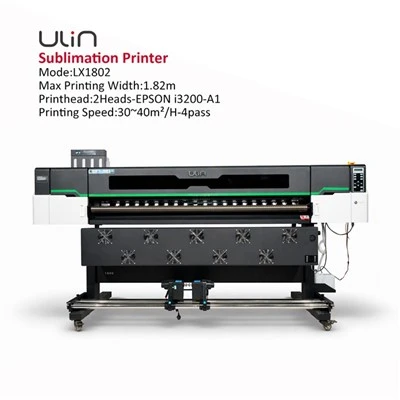
The first error that trips up almost every new DTF printer user is inconsistent film adhesion during the transfer step. This is when you print your design onto the PET film, dust it with adhesive powder, cure it, and then when you peel the film away from the garment, parts of the design stick to the film instead of the fabric. I’ve seen this happen to people who just unbox the printer, skip the calibration step, and start printing right away. More often than not, the issue isn’t the printer—it’s either the film, the powder, or the curing time. Cheap no-name PET film from random suppliers has a coating that repels powder, so the adhesive doesn’t stick evenly to the ink, leading to patchy transfers. I always tell customers to test film from reliable brands before buying a bulk roll, because even a $20 roll off Amazon can ruin an entire order of 50 hoodies. Another common cause here is under-curing the powder. When you cure the powder after dusting, you need to get it hot enough (usually between 200°F and 250°F, depending on your machine) to melt the adhesive. If you pull the film too soon, the powder doesn’t set, so it falls off during peeling. I once had a customer who ran 100 t-shirts with half-cured powder and lost $800 worth of material because he set his oven to 150°F. The fix here is simple: test a small piece first, adjust your curing temp, and make sure you’re using powder that’s formulated for DTF, not the powder you’d use for screen print transfers.
Next up: banding in printed designs. Banding is those horizontal lines that run across your print, where color is uneven—some parts are too light, some are too dark, so a photo of a dog or a logo looks streaky instead of crisp. A lot of new users think this is a print head issue, and they’ll panic and order a new set of print heads, which can cost hundreds of dollars. More often, banding comes from a missed calibration step after you install the print heads or replace ink. DTF printers use a series of print heads that fire droplets to build up your design, and if they’re not aligned properly, the lines from each head don’t line up, leading to that uneven striping. Another cause is low ink levels—if one or more color cartridges are empty, the printer will skip firing drops in that area, creating a gap in the line. I also see banding happen when the printer’s platen (the flat surface that holds the film) has dust or lint buildup, or if the film isn’t feeding smoothly. If the film skips forward a little mid-print, the print heads end up printing on the wrong spot, leading to bands. The fix here is: run a nozzle check first to make sure all colors are firing, then do a head alignment calibration specific to your DTF model. If banding is still happening, clean the platen with a lint-free cloth and isopropyl alcohol, and check your film feed rollers for any crumbs or debris that might be stopping the film from moving evenly.
Clogged print heads are another super common error, and one that leads to a lot of frustration for users. A clogged print head happens when ink dries inside the tiny nozzles of the print head, so they can’t fire ink anymore. For DTF printers, this is extra tricky because DTF ink is water-based, so if the printer sits unused for more than a day or two, the ink can thicken and dry. I’ve had customers who take a two-week vacation, come back, and find half their print heads are completely clogged, and they have to do multiple deep cleans to get them working again. Another cause of clogged heads is using the wrong ink. Some customers buy cheap compatible ink from random suppliers to save money, but that ink has additives that don’t match the printer’s formulation, leading to clogs much faster. I always tell users to stick to OEM (original equipment manufacturer) ink for their DTF printer, because it’s tested to flow through the print heads correctly and reduce clogs. The fix for minor clogs is a regular clean cycle through the printer’s control panel—don’t do a deep clean right away, because that can waste a lot of ink. For stubborn clogs, you can remove the print head (make sure your printer is turned off first) and soak the nozzles in warm distilled water for 10 minutes, then gently pat dry with a lint-free cloth. If that doesn’t work, it’s time to replace the print head, but that’s avoidable with regular maintenance.
Error codes related to film feeding are also top of the list. These are the messages that pop up on your printer’s screen saying “Film Feed Error” or “Out of Paper,” even if you have a full roll of film loaded. This happens for a few reasons: first, the film roll is loaded incorrectly—if you don’t align the roll with the printer’s guide rails, it can feed crookedly, which trips the sensor. Another reason is static buildup on the film. DTF film is thin and plastic, so it builds up static, which can trigger the paper sensor even if there’s film there. I’ve seen this happen in dry winter months especially, where the air is super low humidity, and the film sticks to the sensor. A quick fix here is to run a damp lint-free cloth along the film before loading it, to reduce static, or add a small humidifier to the room where the printer is sitting to cut down on static. Another feeding error happens when the film’s leader (the blank edge of the roll that loads into the printer) is torn or crumpled. Make sure you always load a straight leader, and if it gets damaged, cut it clean with a utility knife before loading.
Overheating errors are less talked about, but they’re a big issue for printers that run long jobs. When you’re printing a design that’s 100” long, the print heads are firing nonstop, and they can get too hot, leading the printer to shut down mid-job or give an overheating error. This is especially common in small print shops where printers are packed into a corner with no airflow. I tell customers to make sure their printer has at least 6 inches of space around all sides for ventilation, and to run a fan if the room is warm. Some printers also have a heat setting that’s too high for the print heads, so if you’re getting overheating errors, you can lower the print head temperature a few degrees in the printer’s settings. If you run long jobs often, we also recommend keeping extra print heads on hand, but again, good airflow is the easiest fix.
One error that’s specific to DTF, not other digital printing methods, is powder contamination. DTF works by printing ink onto film, then dusting the wet ink with adhesive powder to make the design stick to the fabric. If your workspace is dusty, or you’re using dirty powder, that dust can get into the print head nozzles or the film, leading to spots on your print or even clogs. I had a customer once who set up his printer in a garage where he was also cutting vinyl and sawdust was floating around, and every print had tiny black spots. The fix here is to keep your DTF workspace clean, cover the printer when it’s not in use, and use a powder that’s stored in a sealed container. Also, after you finish dusting, make sure you shake off all excess powder before curing, because leftover powder can get on the film and cause uneven printing.
Now, beyond these common errors, there are a few mistakes that new users make that turn small issues into big headaches. First, not doing regular maintenance. I always tell customers to do a nozzle check once a week, even if they’re not printing a lot, to catch clogs early. Also, replacing ink cartridges before they’re completely empty—if you let the printer run on empty, it can suck air into the lines, leading to air bubbles in the ink. Air bubbles are another tiny error that causes missing color in prints, and they’re easy to fix: run a purge cycle through the printer to push the bubbles out, instead of calling a technician. Second, not testing settings on different fabrics. What works on a cotton hoodie might not work on a polyester t-shirt, and if you’re printing a new material, always do a test print first before running a full order. I’ve seen people ruin 50 custom orders because they didn’t adjust the heat press temp for a new fabric.
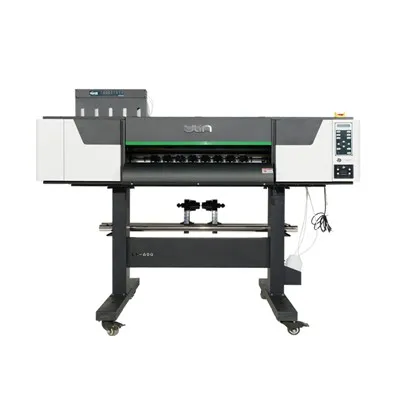
As a DTF printer supplier, my goal isn’t just to sell you a machine—it’s to make sure you can use it consistently, without stress. If you’re in the market for a DTF printer, or you’re having ongoing issues with your current machine, don’t hesitate to reach out to talk through your needs, troubleshoot problems, or learn about maintenance tips that will keep your printer running for years. Whether you’re a one-person startup or a growing print shop, we’re here to help you avoid the common errors that cost time and money.
Sublimation Printer References
- Digital Printing Association. (2022). Common Maintenance and Error Resolution for Digital Direct-to-Film Printers. DPA Technical Whitepaper.
- Textile Printing Industry Journal. (2023). Troubleshooting DTF Transfer Adhesion and Print Quality Issues. Vol. 18, No. 3, 45-52.
- Print Equipment Manufacturers Association. (2021). Best Practices for DTF Print Head Care and Ink Compatibility. PEMA Maintenance Guide.
- Small Business Printing Report. (2022). Uptime Challenges for Apparel Printing Businesses: A Survey of 200 DTF Users. Independent Industry Analysis.
Hangzhou Yulan Technology Co., Ltd.
Hangzhou Yulan Technology Co., Ltd. is one of the most professional DTF printer manufacturers and suppliers in China. With abundant experience, we warmly welcome you to wholesale the newest DTF printer in stock here from our factory. Good service and quality products are available.
Address: 3rd Floor, Building 4, Kechuang Park, No. 43 Wuzhou Road, Donghu Sub-district, Linping District, Hangzhou,CHINA
E-mail: ulinprint@gmail.com
WebSite: https://www.ulinprinter.com/
